Inbound
For creating an Inbound order, select Inbound as the Order Type in the Order Entry form.
This will display specific fields related to inbound shipments that need to be completed to submit the order.
First Section
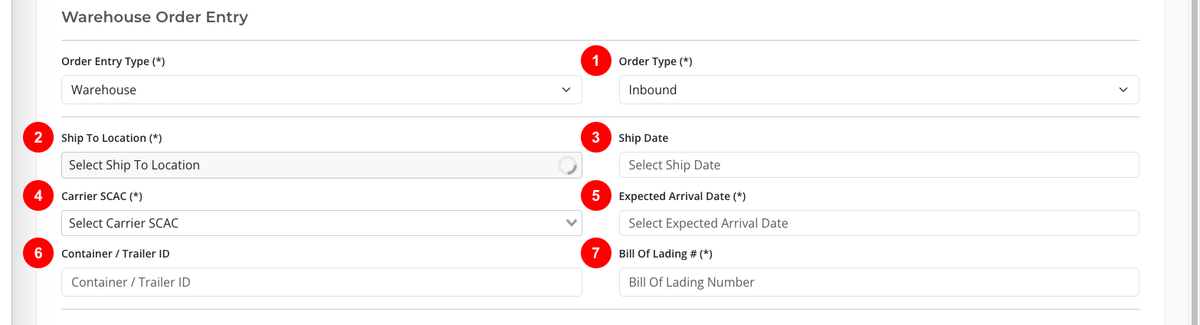
This section includes information related to the warehouse order itself. It has the following fields:
- Order Type (mandatory): Inbound.
- Ship To Location (mandatory): Select the destination location.
- Ship Date (mandatory): Choose the ship date.
- Carrier SCAC (mandatory): Enter the carrier SCAC.
- Expected Arrival Date (mandatory): Choose the expected arrival date.
- Container / Trailer ID
- Bill Of Lading # (mandatory)
Contact Details
This section includes the contact details for the order. It has the following fields:
- Contact Name (mandatory)
- Contact Email (mandatory)

Product Details
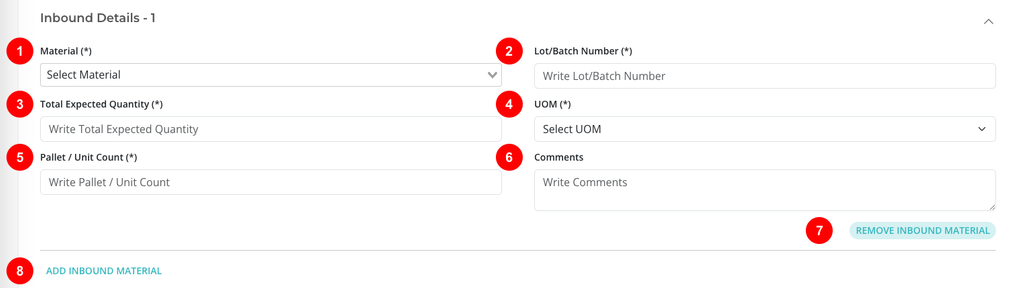
Each product line contains the material and quantity details for the order.
- Material (mandatory)
- Lot/Batch Number (mandatory)
- Total Expected Quantity (mandatory)
- UOM (mandatory)
- Pallet / Unit Count (mandatory): Enter the number of pallets or units expected in the shipment.
- Comments: Add any additional comments or instructions related to the product line.
- REMOVE INBOUND MATERIAL: Removes the current product line.
- ADD INBOUND MATERIAL: Adds another product line.
Submit the Order
When all required fields are completed, click SUBMIT ORDER to create the order.
warning
Once an order has been submitted, it cannot be edited or deleted in OnTrack. To make changes or request its removal, contact Customer Support.