Outbound Tab
OnTrack allows you to view all your outbound orders from the Outbound tab, i.e., from here, you can see the truckload listings that are scheduled to load from your warehouse facilities.
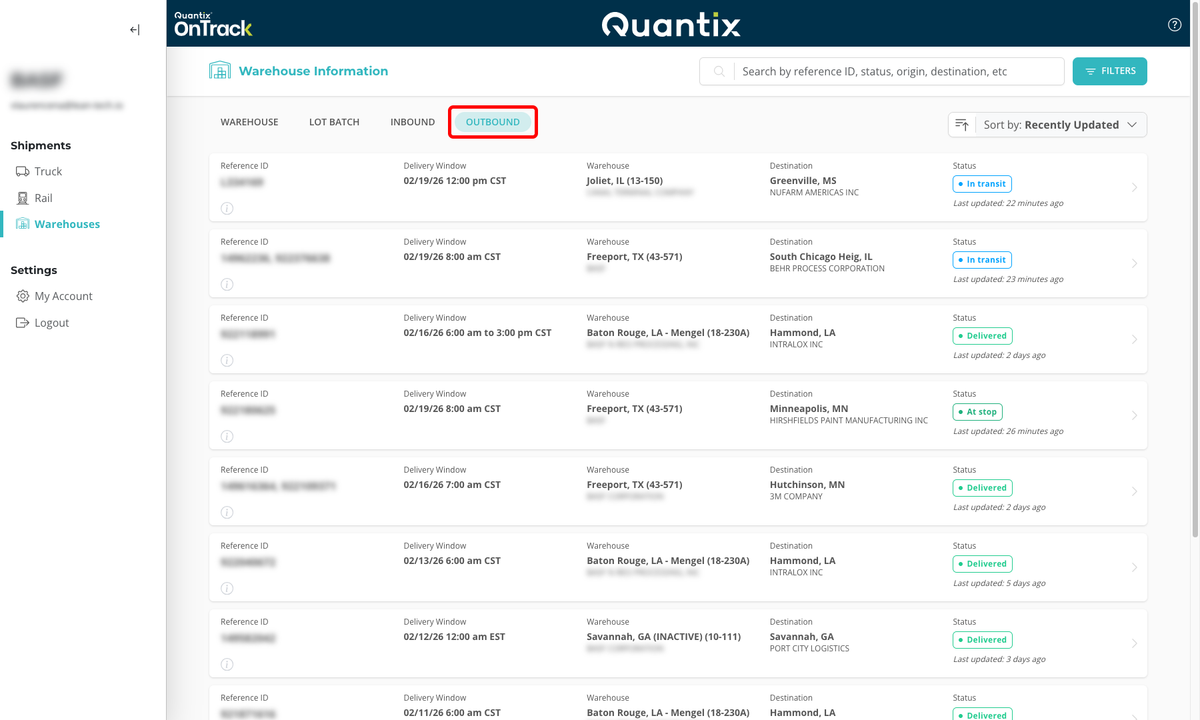
Searching for an Outbound Order
You can use the search bar in the Outbound tab to search outbound shipments by reference ID, status, origin, or destination.

Filtering Outbound Order
Outbound filters can be used to narrow list results based on several combinable criteria. This allows you to see any number of outbound shipments that meet exactly the criteria you are looking for.

When you select the filter button you will be given a list of criteria you can filter by:
The available filtering criteria are:
- Timing: On time, at risk, and late.
- Status: Open, Dispatched, In-Transit, At-Stop, Delivered, and Cancelled.
- Date range: A custom date range or a specific date.
- Origin and destination: City or state, both for origin or destination.
- Company: Origin and/or destination company.
- Equipment: Liquid, Dry Bulk, Drayage, Dry Van, ISO Containers, and Intermodal.
To clear filters, just hit the CLEAR FILTERS button at the bottom of the filtering menu.
Sorting Outbound Orders
If you want to organize your data by specific criteria you can use the Sort by button located right underneath the Filter button.

Using the drop-down arrow you can select to sort by the following criteria.
- Recently Updated - sorts by when the shipment last reported location data
- Status - sorts by the shipment's current status
- Origin - sorts by the loading location
- Delivery Window - sorts by the shipment's delivery date and time
- Destination - sorts by delivery location

Once you've selected the criteria you want to sort by, you can change to ascending or descending by selecting the icon to the left of the drop-down menu.

Outbound Card Details
Outbound cards will give users an at-a-glance information about shipments they need to know about such as:
Reference ID (redacted here for privacy)

ETA Status - shows if the shipment is On Time, At Risk, or Late

Delivery Window

Warehouse - loading location - warehouse name, city, state, and zip

Destination - delivery location - company name, city, state, and zip

Status - current shipment status

Last Updated - last time the shipment received location data

Clicking on an outbound card will take the user to the truckload page for that shipment.
