Truck Module FAQs
Can I track my shipments in real time?
Yes. OnTrack provides real-time shipment tracking, including current location, shipment status, and estimated time of arrival (ETA).
When will my shipment start tracking?
We begin attempting to locate the truck 90 minutes before the appointment window start time. This lead time is configurable by tenant.
How often are you retrieving updates?
This depends on the tracking method. Project44 attempts to get at least 15-minute tracking updates, and we will not prevent anyone from sending updates more frequently.
Why are shipments not showing up in OnTrack?
Potential Reason: If a shipment was not successfully accepted by a Quantix TMS, it will not be visible within OnTrack.
Solution: Verify the shipment was created with a CSR. If the shipment was not correctly added, work with a Quantix representative to correct the issue.
What time zone are the appointment windows displayed in?
The time zone of the stop location will be used for all pickup and delivery milestones. The breadcrumb GPS trail and "last updated" are in your local browser time.
How often is ETA calculated?
The ETA algorithm includes many components: the driver's hours of service, historical and real traffic, historical and real weather, lane data, mechanical issues, fuel stops, and driving bans (only if in the EU). ETA is only provided when a status update is received. If the vehicle does not move, we sometimes do not get a status update. Updates are highly variable based on the data source
Does ETA consider location operational hours?
Not by default. We are working on a feature to use location hours and will be considered when determining ETA.
How does your ETA handle dwell time at stops?
Each tenant is configured to utilize a default stop dwell time of 1 hour. Individual location dwell times are being considered as a future enhancement.
Why are certain locations (e.g., Distribution Centers, Facilities) not tracking for a particular carrier?
There are a few potential reasons why certain locations are not tracking for a particular carrier.a
Potential Reason 1: The carrier has not turned on certain "Bill-to" codes or Shipper IDs associated with the account.
Solution: Submit a support ticket on our User Support website to validate that proper Shipper IDs are "turned" on. If you provided BOLs during the implementation phase, the team can work with you to send over BOL examples to ensure all "Bill-to" codes are turned on. Ensure that a certain location (e.g., Distribution Centers, Facilities) is passing along the mutually decided shipment ID that will be used for tracking.
Potential Reason 2: The TMS providing the pickup dates are incorrect and the system is not tracking on the date you believe they are correct.
Solution: Contact your Quantix CSR rep to correct the issue.
Potential Reason 3: The address is incomplete.
Solution: To have the address corrected, submit a support ticket on our User Support website.
Why did a shipment suddenly change directions? Why did the shipment suddenly cease tracking?
Potential Reason: The carrier is making drop-trailer shipments.
Solution: The power unit tracks the shipment by ELD or Carrier API. If a shipment suddenly changes direction or ceases tracking, it is most likely due to the carrier making drop trailer shipments or assigning a new truck.
Do I need proper appointment windows to have good tracking?
Yes, shipment appointment windows must be sequential. At least one appointment window must be in the future.
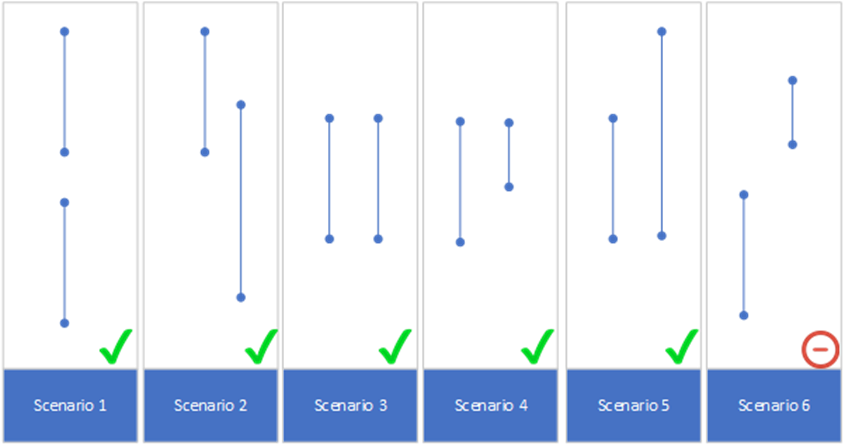
Here are examples of appointment windows overlapping possibilities:
| Scenario | Type | Description |
|---|---|---|
| 1 | No overlap | Normal appointment windows, not overlapping |
| 2 | Overlapping start stop 2 with end stop 1 | AppointmentWindow.startdatetime on stop 2 overlaps with AppointmentWindow.enddatetime end for stop 1 |
| 3 | Equal start and end on both stops | Appointment windows are equal for each stop |
| 4 | Same start but stop 2 ends before stop 1 | AppointmentWindow.startdatetime is equal for both stop 1 and 2 and AppointmentWindow.enddatetime for stop 2 ends before stop 1 |
| 5 | Stop 2 start before stop 1 | AppointmentWindow.startdatetime for stop 2 start before stop 1 and ends at the same time |
| 6 | Stop 2 ends before stop 1 starts | AppointmentWindow.startdatetime for stop 2 start before stop 1 and ends at the same time |
Can I track my shipment from stops A --> B --> A --> C?
Yes. Round-trip loads are supported if setup correctly in the Quantix TMS system of the division tendering the shipment.
Can I receive all tracking updates through email notifications?
No.
How do I make updates to truckload shipments?
Please contact your Quantix representative or send an updated EDI if it is enabled.