Pinning a Shipment
When you have significant shipments that need to be monitored, it can be time-consuming to get consistent updates from their carriers.
For that reason, OnTrack has a feature that allows you to pin one or multiple shipments to the top of your Main Page view and leave them there until they're unpinned.
The pinned shipment(s) will stay at the top of your list, regardless of any filters or searches you apply.
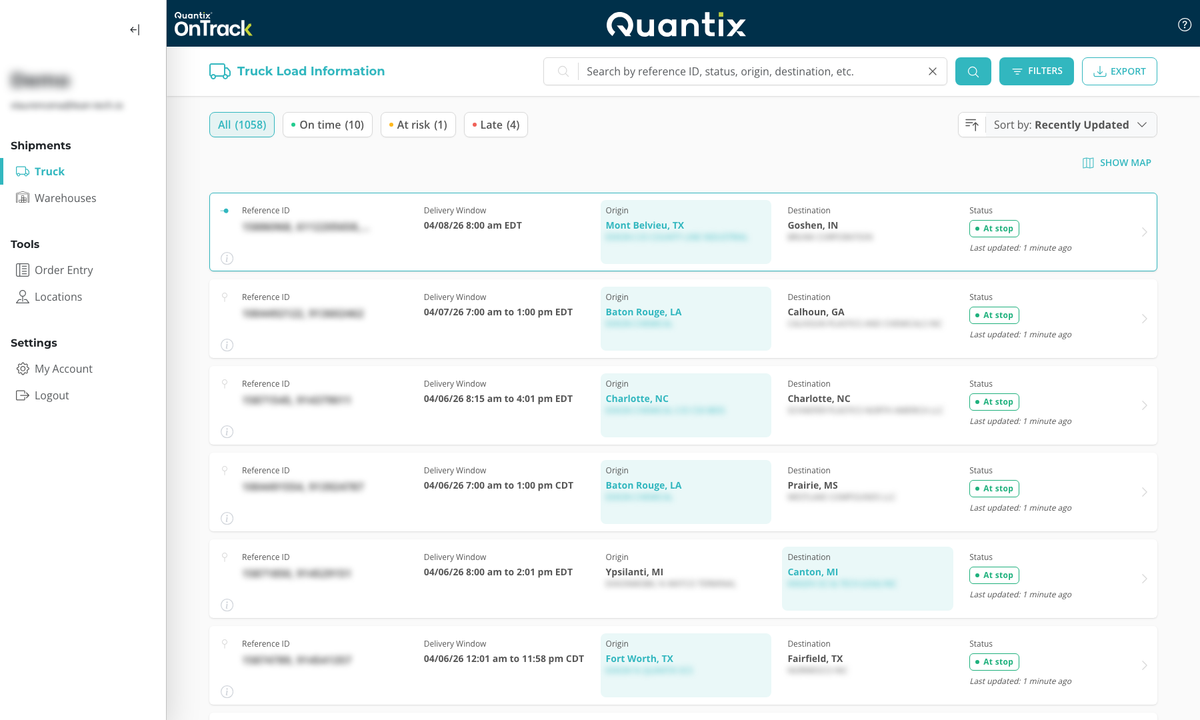
Pinning a shipment is very easy. When you find the shipment you want to pin, simply click the pin icon in the top-left corner of the shipment card.

When pinned, the shipment will appear at the top of your list, with a light blue border to distinguish it from other shipments. You'll notice the pin icon is also highlighted in blue.
To unpin the shipment, just click on the blue pin icon, and the shipment will fall back into the general list of shipments.